

Laser propagation conventions#
Laser direction#
When creating a LaserBeam object, one has to provide its direction, which can be defined in two ways:
in the form of a vector, defining the propagation axis of the laser. Note that this vector does not have to be a unit vector: the
LaserBeamobject will take care of normalizing it when needed.
in the form of a (θ, 𝜙) tuple, where θ and 𝜙 are respectively the polar and azimuthal angles defining the orientation of the laser propagation axis.
Fig: Laser propagation axis definition
the laser propagation is defined by a direction vector \(\vec{u}\). The vector can be parametrized using two angles, θ and 𝜙, corresponding to the polar and azimuthal angles of \(\vec{u}\) in the lab frame.

Below is an example of how to use those two conventions to declare a laser beam propagation along the +z direction.
from atomsmltr.environment import GaussianLaserBeam
# beam propagating along z
# option 1 > unit_vector = (0,0,1)
beam = GaussianLaserBeam(direction=(0,0,1), direction_type="vector")
# option 1 > θ = 0, 𝜙 =0
beam = GaussianLaserBeam(direction=(0,0), direction_type="thetaphi")
Laser frame#
Definition#
Some laser properties, such as the laser polarization, are defined in the laser frame. In the following, we denote \(\mathcal{R}\) the lab frame and \(\mathcal{R}^{\prime\prime}\) the laser frame. Our laser frame definition is such that the laser propagation unit vector coincides with the \(z^{\prime\prime}\) direction of the laser frame, i.e. \(\vec{e}_{z}^{\prime\prime} \equiv \vec{u}\). We denote \((x^{\prime\prime}, y^{\prime\prime}, z^{\prime\prime})|_{\mathcal{R}^{\prime\prime}}\) the coordinates in the laser frame.
Fig: Laser frame definition
In the laser frame, the laser propagates along the \(z^{\prime\prime}\) axis. We then call \(x^{\prime\prime}\) the “vertical” axis and \(y^{\prime\prime}\) the “horizontal” axis.
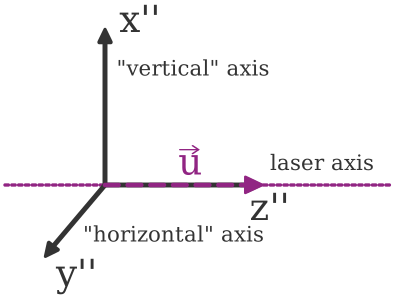
Since this definition is not sufficient to unambiguously define the laser frame \(\mathcal{R}^{\prime\prime}\), here is how we go from the lab frame \(\mathcal{R}\) to \(\mathcal{R}^{\prime\prime}\) in two steps:
STEP 1 : \(\mathcal{R} \to \mathcal{R}^{\prime}\)
First, we perform a rotation around \(\vec{e}_z\) with an angle \(\phi\). The coordinates \((x^{\prime}, y^{\prime}, z^{\prime})|_{\mathcal{R}^{\prime}}\) in the new frame can be expressed as
STEP 2 : \(\mathcal{R}^{\prime} \to \mathcal{R}^{\prime\prime}\)
Second, we perform a rotation around \(\vec{e}_y^\prime\) with an angle \(\theta\). After this second rotation, \(\vec{e}_z^{\prime\prime}\) coincides with \(\vec{u}\). The coordinates \((x^{\prime\prime}, y^{\prime\prime}, z^{\prime\prime})|_{\mathcal{R}^{\prime\prime}}\) in the new frame can be expressed as
So, in the end, we have the following relation between the coordinates \((x^{\prime\prime}, y^{\prime\prime}, z^{\prime\prime})|_{\mathcal{R}^{\prime\prime}}\) in the \(\mathcal{R}^{\prime\prime}\) (laser) frame and \((x, y, z)|_{\mathcal{R}}\) in the \(\mathcal{R}\) (lab) frame:
STEP 1 & 2: \(\mathcal{R} \to \mathcal{R}^{\prime\prime}\)
or, likewise
Illustration in atomsmltr#
In the following, we define a laser beam with vertical polarization, meaning that its polarization vector is aligned with the \(x^{\prime\prime}\) axis in the laser frame. Using the methods get_polarization_vector_in_lab_frame() and get_polarization_vector_in_lab_frame(), we illustrate the frame transformation:
# initialize a beam with "vertical" polarization
from atomsmltr.environment import GaussianLaserBeam, Vertical
beam = GaussianLaserBeam()
beam.polarization = Vertical()

# beam propagating along z
#   > laser frame = lab frame
beam.direction = (0, 0, 1)
beam.get_polarization_vector_in_lab_frame() # > (1, 0, 0)
beam.get_polarization_vector_in_laser_frame() # > (1, 0, 0)


# beam propagating along -z
#   > x" → -x
beam.direction = (0, 0, -1)
beam.get_polarization_vector_in_lab_frame() # > (-1, 0, 0)
beam.get_polarization_vector_in_laser_frame() # > (1, 0, 0)

# beam propagating along y
#   > 𝜙 = π/2 ; θ = π/2
#   > x" → -z
beam.direction = (0, 1, 0)
beam.get_polarization_vector_in_lab_frame() # > (0, 0, -1)
beam.get_polarization_vector_in_laser_frame() # > (1, 0, 0)
The LaserBeam class also includes a set of hidden methods to convert coordinates or vectors between the lab and laser frames:
_convert_coordinates_to_laser_frame()_convert_coordinates_to_laser_frame()_convert_vector_to_lab_frame()_convert_vector_to_laser_frame()